 DMSS Docs
Basic OperationsConfiguring DevicesVideo Play Settings
Customizing Audio and Video Encryption
Create your own custom audio and perform video encryption.
Background Information
You can create your own custom audio and perform video encryption. After enabling Encrypt Video, you need to enter the password for live view and playback (cloud videos included).
Procedure
-
On the Device screen, tap
 next to a device, and then tap Device Details.
 -
In the Function Settings area, tap More.
-
Tap
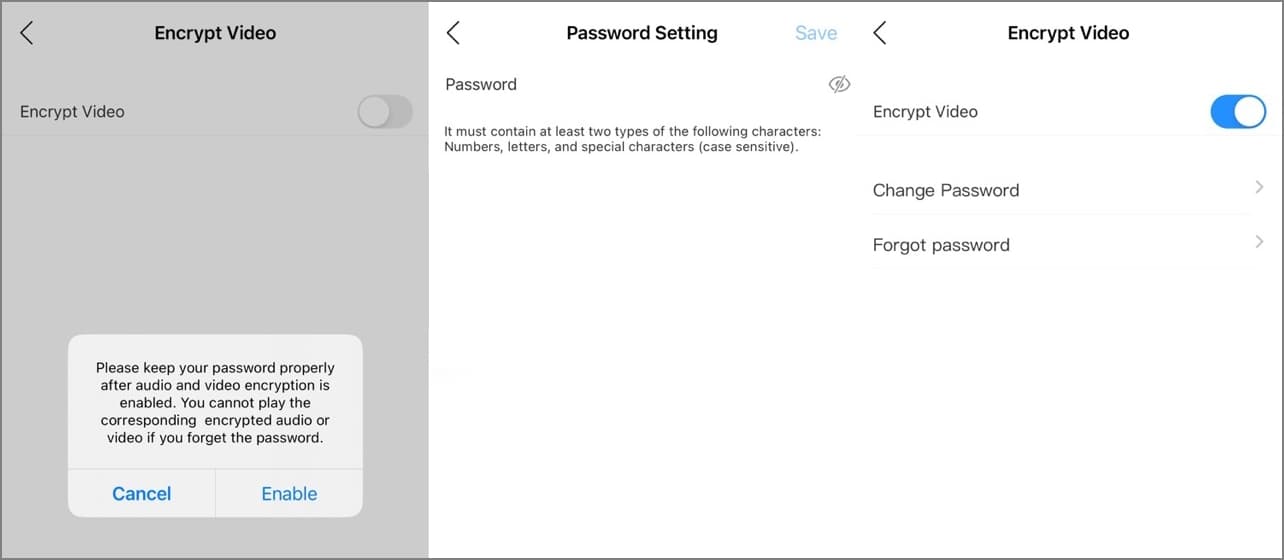
 next to Encrypt Video to enable the function.
Figure 1 Custom audio and video encryption
-
After a prompt appears, tap Enable.
-
On the Password Setting screen, set a password, and then tap Save.
After setting the password, Modify Password and Forget password will appear on the Custom Audio and Video Encryption screen, and
 will become
  .
.
Related Operations
- To modify the password, tap Modify Password on the Custom Audio and Video Encryption screen, and then enter the old and new password.
- To change the password if you forget the old one, tap Forget Password on the Custom Audio and Video Encryption screen, and a verification email will be sent to your linked email. Enter the verification code from the email and then create a new password.