 DMSS Docs
Basic OperationsEntrusting Devices
Entrusting Devices in Batches
You can entrust devices to the service provider in batches.
Entrusting Devices in Batches
You can entrust devices to the service provider in batches.
Prerequisites
You have bound with a service provider. For details, see Me.
Procedure
-
On the Device screen, select
 , and then tap .
 -
On the Device Entrusting screen, confirm the information of the bound service provider, or you can also tap
 to scan the QR code of the service provider.
 -
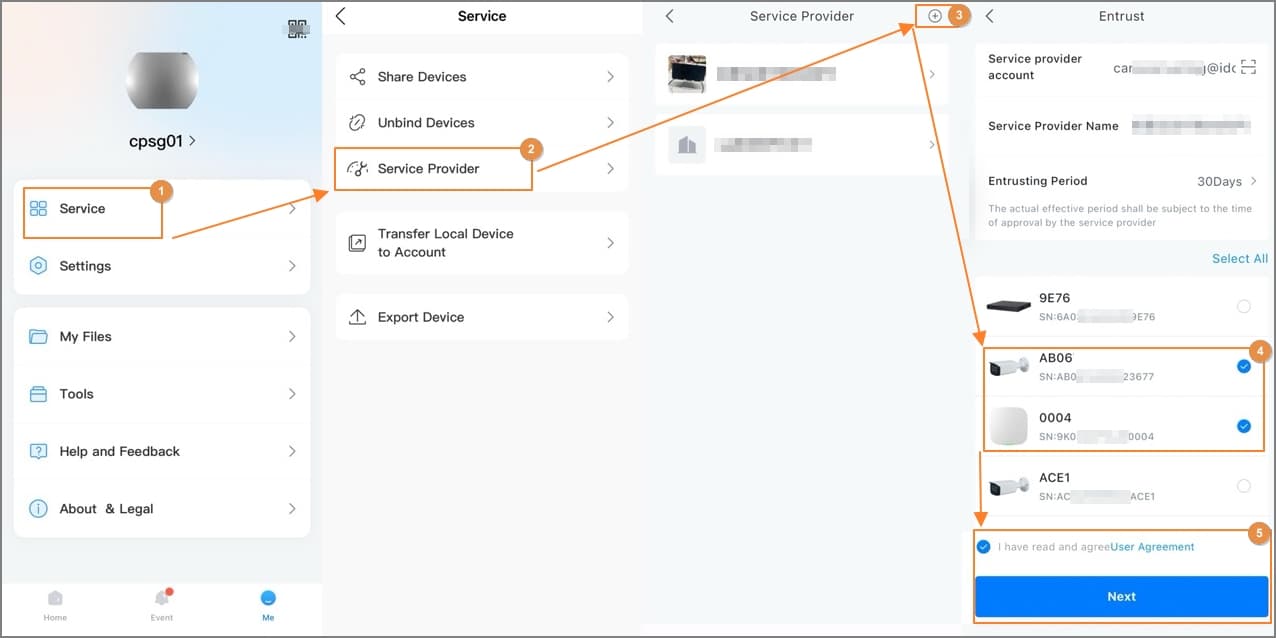
Select the devices to be entrusted, and then entrust those to DoLynk Care. The process for entrusting multiple devices is the same as entrusting a single device. For details, see Entrusting the Device One by One.
Figure 1 Entrust devices in batches